
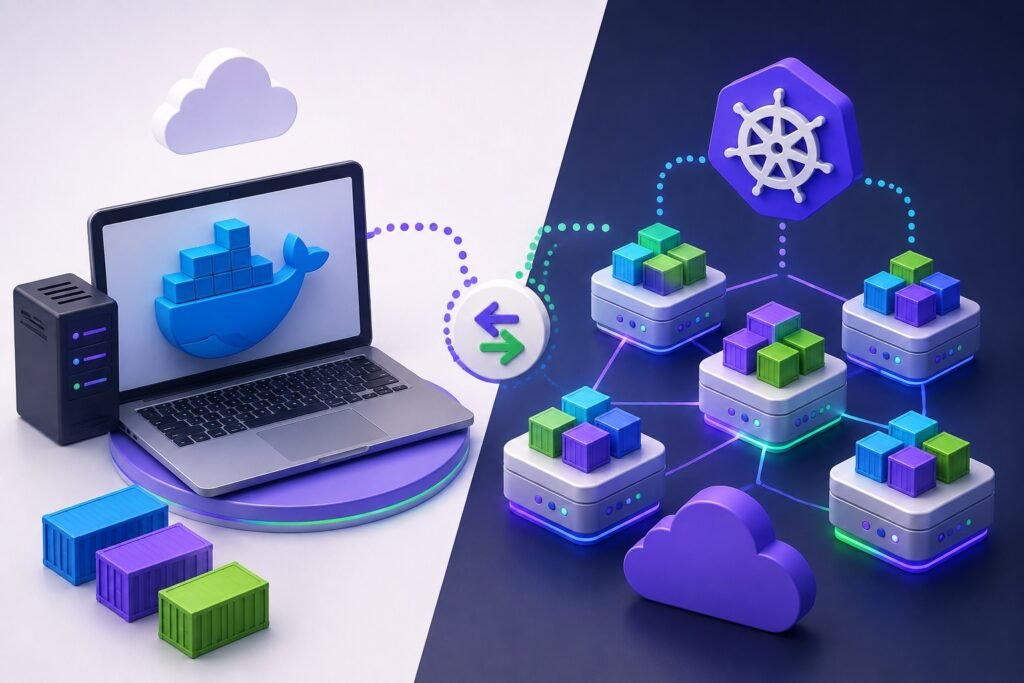
Ask five developers when to use Docker and when to use Kubernetes, and you’ll often get five different answers, mostly because the two tools solve related but very different problems. Many teams end up either over engineering a simple app with a full Kubernetes cluster, or under engineering a growing product that’s outgrown a handful of Docker containers.
Whether you’re a startup shipping your first containerized app or an established business managing dozens of services, understanding where Docker ends and Kubernetes begins makes a real difference in cost, reliability, and how fast your team can move.
In this article, we break down the core differences between Docker and Kubernetes, when each one makes sense, and how IOTAIY helps businesses design, containerize, and deploy modern applications the right way from day one.
Why the Docker vs Kubernetes Question Matters
Choosing the wrong tool, or the wrong combination of tools, doesn’t just add complexity, it can slow down releases and make scaling far harder than it needs to be.
- Docker and Kubernetes solve different problems, so picking one over the other depends on your actual scale and workload
- Over adopting Kubernetes too early adds operational overhead most small teams don’t need yet
- Sticking with Docker alone once traffic and services grow can lead to manual scaling headaches
- The right setup directly affects deployment speed, uptime, and infrastructure cost
- Development, testing, and production environments all behave differently depending on which tool is driving them
As a result, understanding what each tool actually does is the first step to building infrastructure that fits the business, not the other way around.
Why This Comparison Matters More Than Ever in 2026
Application architecture keeps getting more distributed, and the tooling decisions made early on have a growing impact as systems scale.
- Microservices architectures are now common even among mid sized businesses, not just large enterprises
- Cloud providers increasingly build their platforms around container orchestration by default
- Rising infrastructure costs make right sizing your deployment strategy more important than ever
- Faster release cycles depend on reliable, repeatable deployment pipelines
- Remote and distributed teams need consistent environments across development, staging, and production
Therefore, businesses that understand this distinction early can scale smoothly instead of rebuilding their infrastructure under pressure later.
Docker vs Kubernetes: Key Differences Explained
Below is a breakdown of where Docker and Kubernetes differ, what each is actually built for, and how to think about using them together.
1. Core Purpose: Containerization vs Orchestration
The most fundamental difference is what each tool is actually designed to do, and confusing the two is where most misunderstandings start.
What it means
- Docker packages an application and its dependencies into a single, portable container
- Kubernetes manages, schedules, and coordinates many containers running across multiple machines
Where it matters
- Docker alone answers “how do I package and run this app consistently”
- Kubernetes answers “how do I keep dozens or hundreds of these containers running reliably at scale”
- Using Kubernetes without understanding Docker first usually leads to confusion down the line
How to approach it
- Start by containerizing the application properly with Docker before introducing orchestration
- Treat Kubernetes as the layer that manages Docker containers, not a replacement for them
2. Scope: Single Host vs Multi Host Clusters
Docker on its own is typically built around a single machine, while Kubernetes is designed to manage workloads spread across many.
What it means
- A standard Docker setup runs containers on one host or server
- Kubernetes clusters distribute containers across multiple nodes for redundancy and capacity
Where it matters
- Single host Docker setups are simpler but create a single point of failure
- Multi node Kubernetes clusters can survive individual server failures without downtime
- Businesses with unpredictable or growing traffic benefit far more from a multi node setup
How to approach it
- Use Docker alone for smaller apps, internal tools, or early stage products
- Move to Kubernetes once uptime requirements or traffic outgrow what a single host can reliably handle
3. Scaling: Manual vs Automated
How each tool handles increased demand is one of the clearest practical differences between them.
What it means
- Scaling containers with Docker alone generally requires manual intervention or custom scripts
- Kubernetes can automatically scale containers up or down based on real time demand
Where it matters
- Manual scaling works fine for predictable, low traffic applications
- Automated scaling becomes essential for apps with traffic spikes, seasonal demand, or unpredictable usage
- Getting scaling wrong in either direction leads to either downtime or wasted infrastructure spend
How to approach it
- Set up Kubernetes autoscaling rules based on actual usage patterns, not guesswork
- Regularly review scaling thresholds as traffic patterns change over time
Read Also: Talk to the IOTAIY Team About Containerizing Your Application
4. Networking: Docker Networks vs Kubernetes Services
Both tools handle networking very differently, and this is often where deployments get tripped up when moving from one to the other.
What it means
- Docker uses relatively simple bridge or host networks to connect containers on one machine
- Kubernetes uses Services and internal DNS to let containers communicate reliably across an entire cluster
Where it matters
- Docker networking is easier to set up but doesn’t scale well across multiple hosts
- Kubernetes networking is more complex but gives containers a stable way to find each other even as they move between nodes
How to approach it
- Design service communication with future scaling in mind, even in early Docker only setups
- Bring in Kubernetes Services once the app spans multiple containers that need to reliably talk to each other
5. Storage: Docker Volumes vs Kubernetes Persistent Volumes
Keeping data safe when containers restart or move is handled very differently depending on the tool in use.
What it means
- Docker volumes attach storage to containers running on a single host
- Kubernetes Persistent Volumes abstract storage so it can follow workloads across the cluster
Where it matters
- Docker volumes work well for simple, single server applications
- Persistent Volumes are necessary once containers can be rescheduled onto different nodes
- Getting storage wrong can mean losing data when a container restarts or moves
How to approach it
- Map out which data truly needs to persist before choosing a storage approach
- Use Kubernetes Persistent Volumes for any stateful workload running in a cluster
6. Deployment Complexity: Docker Compose vs Kubernetes Manifests
The learning curve and day to day operational overhead differ significantly between the two.
What it means
- Docker Compose defines multi container setups in a single, relatively simple file
- Kubernetes uses more detailed manifests covering deployments, services, config, and scaling rules
Where it matters
- Docker Compose is faster to learn and set up for smaller projects
- Kubernetes has a steeper learning curve but offers far more control at scale
- Jumping straight to Kubernetes without the right expertise often slows teams down rather than speeding them up
How to approach it
- Use Docker Compose for local development and smaller production workloads
- Bring in experienced DevOps support when moving to Kubernetes to avoid a steep, costly learning curve
7. Self-Healing and High Availability
How each tool responds when something goes wrong is one of the biggest differences in production reliability.
What it means
- Docker alone doesn’t automatically restart or reschedule failed containers across hosts
- Kubernetes continuously monitors containers and automatically restarts, reschedules, or replaces failed ones
Where it matters
- Applications relying on Docker alone need external monitoring and manual recovery processes
- Kubernetes self-healing significantly reduces downtime without requiring constant manual attention
- High availability requirements almost always point toward Kubernetes or a managed equivalent
How to approach it
- Define real uptime requirements before deciding if self-healing orchestration is necessary
- Use Kubernetes health checks and readiness probes to catch issues before they affect users
8. Ecosystem and Tooling
The surrounding ecosystem, from monitoring to CI/CD integration, differs quite a bit between the two platforms as well.
What it means
- Docker has a simpler, more contained ecosystem centered around building and running containers
- Kubernetes has a much larger ecosystem covering monitoring, service meshes, ingress control, and more
Where it matters
- A smaller ecosystem means less to learn but also fewer built in capabilities
- Kubernetes’ broader ecosystem supports more advanced use cases but adds tooling decisions of its own
- Choosing the wrong combination of add on tools can add unnecessary complexity
How to approach it
- Start with the minimum set of tools needed and expand the Kubernetes ecosystem gradually
- Work with a team experienced in both platforms to avoid unnecessary tooling sprawl
How IOTAIY Helps Businesses Build Modern, Containerized Applications
Deciding between Docker, Kubernetes, or a combination of both is only the first step, implementing it correctly is what actually determines reliability and cost. IOTAIY helps businesses architect, containerize, and deploy modern applications built to scale from day one.
- Application architecture reviews to determine whether Docker, Kubernetes, or both fit your workload
- Containerizing existing applications with Docker for consistent development and deployment
- Designing and managing Kubernetes clusters for businesses ready to scale
- Setting up CI/CD pipelines that integrate cleanly with your containerized infrastructure
- Ongoing DevOps support, monitoring, and cost optimization as your infrastructure grows
As a result, businesses working with IOTAIY get infrastructure that’s sized correctly for where they are today and ready to scale as they grow. Full details on available service tiers are outlined on the IOTAIY pricing page, and businesses can get in touch through the contact page to discuss their specific application and infrastructure needs.
Common Mistakes Businesses Make When Choosing Between Docker and Kubernetes
Even with a general understanding of both tools, businesses often run into the same avoidable missteps.
- Adopting Kubernetes before the application or team actually needs that level of complexity
- Staying on Docker alone long after traffic and services have outgrown a single host setup
- Treating Kubernetes as a one time setup instead of an ongoing operational responsibility
- Underestimating the DevOps expertise required to run Kubernetes reliably in production
- Copying infrastructure decisions from other companies without evaluating actual workload needs
If your team has run into these patterns before, working with an experienced team like IOTAIY can help build an infrastructure strategy that actually matches your application’s needs.
Docker vs Kubernetes at a Glance
| Area | Docker | Kubernetes |
|---|---|---|
| Core purpose | Packages and runs individual containers | Orchestrates and manages many containers |
| Scope | Typically a single host | Multi node clusters |
| Scaling | Mostly manual | Automated based on demand |
| Networking | Simple bridge or host networks | Services with cluster wide DNS |
| Storage | Docker volumes on a single host | Persistent Volumes that follow workloads |
| Self-healing | Requires external monitoring | Built in restart and rescheduling |
| Learning curve | Lower | Higher |
| Best fit | Small apps, local development, single server workloads | Growing, multi service apps needing high availability |
Conclusion
Docker and Kubernetes aren’t competitors, they’re tools built for different stages of the same journey, from packaging an application consistently to running it reliably at scale. Understanding where one ends and the other begins helps businesses avoid both unnecessary complexity and painful growing pains.
For businesses that want modern, properly architected infrastructure without guessing at what fits, partnering with an experienced team like IOTAIY provides a clear path from containerization to a fully orchestrated, production ready deployment.
Read Also: Which Open Source Libraries Are Best for Penetration Testing Software?
Frequently Asked Questions (FAQ)
| 1. Do I need Kubernetes if I’m already using Docker? |
|---|
| Not necessarily. If your app runs on a single server without heavy traffic or high availability requirements, Docker alone may be enough. Kubernetes becomes valuable once you need automated scaling and resilience across multiple servers. |
| 2. Can Docker and Kubernetes be used together? |
| Yes. Kubernetes actually manages containers built with Docker, so the two are typically used together rather than as alternatives to one another. |
| 3. Is Kubernetes always better than Docker alone? |
| Not always. Kubernetes adds real value for applications that need automated scaling and high availability, but it also adds operational complexity that isn’t necessary for every project. |
| 4. How do I know when it’s time to move from Docker to Kubernetes? |
| Common signs include frequent manual scaling, downtime during traffic spikes, growing numbers of interdependent services, or a need for stronger uptime guarantees than a single host setup can provide. |
| 5. How can I get started with IOTAIY’s application and infrastructure services? |
| Businesses can review service options on the pricing page and reach out through the contact page to discuss the right infrastructure approach for their application. |